PlasterFlow  /  How it works  /  Materials & prices

A quote is only as good as the prices behind it

Every job app can multiply an area by a rate. What decides whether you make money is whether the material cost in that number is the one your merchant actually charges you — and whether the bag count matches how thick you lay it. Both of those are yours to set, and the app builds everything else off them.

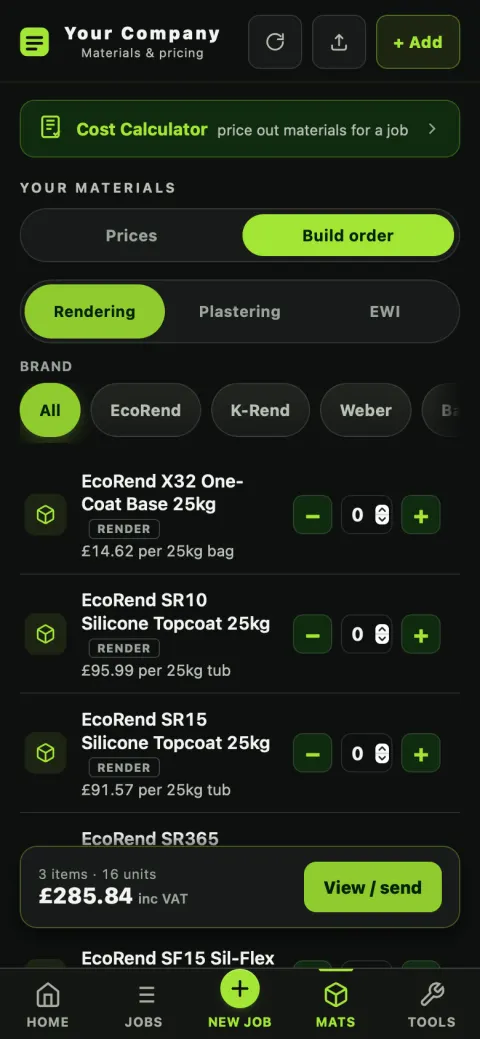
The PlasterFlow materials screen in order-building mode, with quantity steppers and a running total
Mats — prices on one tab, the order on the other
Your prices

Brand, then type, then product

Most apps hand you one alphabetical list of a thousand products and let you scroll. PlasterFlow narrows it the way a merchant's counter does: pick the brand, then the type, then the product. Three taps instead of a search.

  • Prices are yours and ex-VAT — the trade price you pay, per unit, per bag, per board, per roll.
  • Edit any of them, any time. The app arrives with generic trade prices so nothing is blank on day one; the moment you put your own in, yours are the ones it uses.
  • It never overwrites a price you've set. When new products are added to the app they're added — a price you've corrected stays corrected.
  • It syncs. Change a price on the Mac and the phone quotes with it.
Do this before your first real quote. Retail and list prices can run close to double trade, and a starter price left unchecked is a job priced on somebody else's numbers. Twenty minutes with your last few invoices is the highest-value thing you can do in the app.
Coverage rates

How many bags is not a fixed fact — it depends on you

Two renderers on the same wall with the same product can be a pallet apart. The app doesn't pretend otherwise: coverage is a setting, in square metres per bag, and it's yours.

m² per bag, per product

Set it in Business Details → coverage rates. Every take-off, every quote and every order list from then on counts bags at your rate rather than a datasheet's ideal.

Why it matters twice

Too low and you're short on the Thursday and the job stops. Too high and you've bought a pallet you're storing in the garage. It's the same number driving both the estimate and the order.

Set once, remembered

It's stored against your account and synced to your other devices, so it isn't something you re-enter per job.

The take-off

Counted from the visit, not from memory

The measurements you took on the visit are the same measurements that produce the materials list. Nobody re-enters anything, so nobody mistypes anything.

It counts what the system actually needs

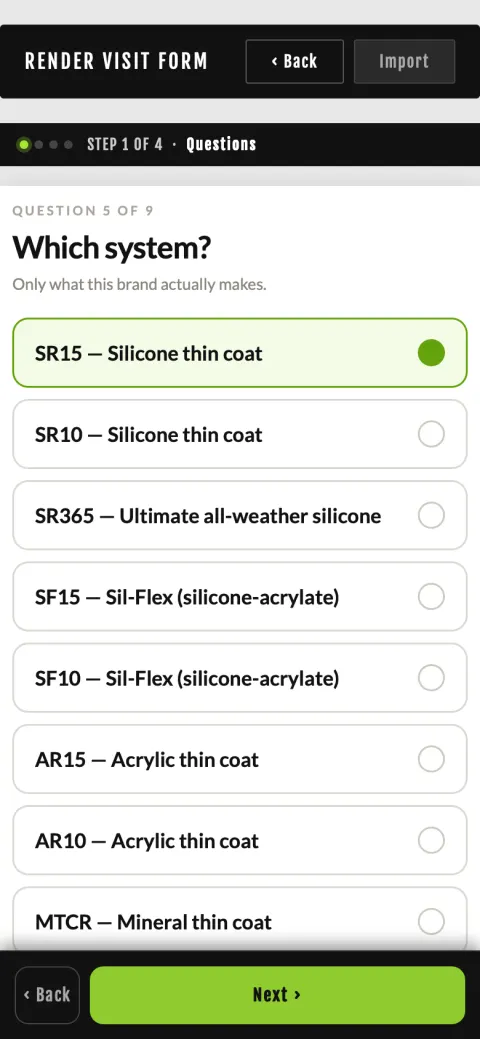
Not just “render”. For a named system that means the primer, the base coat, the mesh, the beads, the topcoat — in the manufacturer's build-up, at the thicknesses that system specifies. For plastering it's boards, adhesive, scrim, angle bead, bonding and finish, with a partition counted as boarded on both faces.

And it describes what it charges you for. If mesh is in the order, mesh is in the scope of works the customer reads. A materials list and a scope that disagree is how arguments start.

Choosing the render system on a PlasterFlow site visit, which determines the materials build-up

Real product names

The order list names the actual products for the brand you picked — not a generic stand-in from a different manufacturer. You can hand it to the counter as it is.

Nudge the quantities

The count is a starting point, not a rule. Bump a line up because of waste, drop one because you've got half a pallet already — the totals follow.

Ordering

Build the order, send the order

Steppers, and a running total

Switch to Build order and set quantities with and . The bar at the bottom keeps a running total including VAT as you go, so you know what the delivery is going to cost before you've sent it.

Grouped by supplier

View / send turns it into an order split by supplier — the render house gets the render, the merchant gets the boards — and sends it on WhatsApp or email, or copies it to paste wherever you like.

Your suppliers, saved

Keep your suppliers' names, emails and phone numbers in Tools → Suppliers so ordering is picking one, and so what comes back gets filed against the right account.

“Remind me”

Ticking remind me when you add materials drops it into your to-do list with a time on it — so “pick up mesh” rings your phone at 7am rather than occurring to you at 9.

Straight onto the job's costs

What you order becomes what the job cost, so the profit so far figure is real spending and not an estimate. Jobs & money →

Prices drift — you'll see it

Because your prices live in one place rather than inside old quotes, a supplier putting 8% on a bag is a number you can actually see, instead of a margin that quietly disappears.

Put your own prices in and quote a real job

14 days free, no card. The prices you set are yours, they export, and they stay yours.